
Can ChatGPT Transcribe Audio?
Author: Pola Yan
Date: April 10, 2026
Summary: ChatGPT can handle basic audio transcription, but for long-form content and structured outputs, Saveto AI offers a more complete and efficient solution.
Introduction
Whether it’s pulling key takeaways from The Joe Rogan Experience, organizing notes after a Zoom meeting, or capturing memorable insights from a TED talk, audio transcription has become a common part of everyday work and learning.
As ChatGPT has rapidly gained popularity thanks to its strong conversational and content generation capabilities, it’s increasingly seen as an all-in-one AI assistant. But how well does it actually perform when it comes to audio transcription? Where are its limitations, and which use cases does it truly fit?
In this article, we take a practical look at ChatGPT’s audio transcription capabilities, examine its limitations, and evaluate how well it performs across different scenarios—while also comparing it with more specialized tools to help you choose the right solution for your needs.
Can ChatGPT Transcribe Audio to Text?
The short answer is yes. ChatGPT can transcribe audio into text and performs reasonably well in everyday speech scenarios. It is powered by OpenAI’s Whisper model, which supports multiple languages and delivers relatively accurate speech recognition.
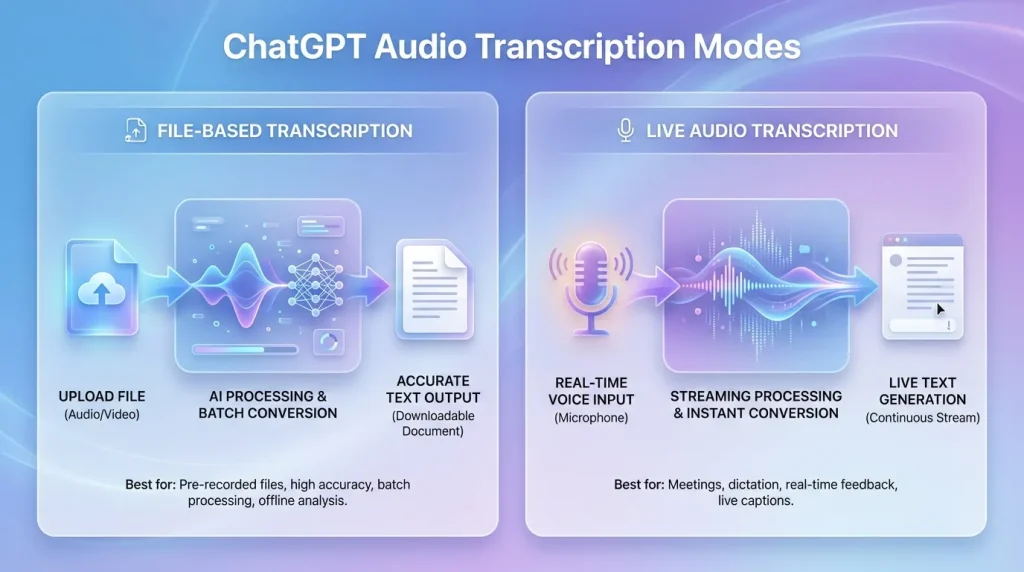
In practice, there are two main ways to use this feature: uploading audio files for transcription or using live voice input for real-time transcription. Each method serves slightly different use cases.
File-Based Audio Transcription
When using ChatGPT—especially with GPT-4o in paid plans—users can upload common audio formats such as .mp3, .wav, .m4a, and .webm. Once uploaded, the audio is processed by the Whisper model and returned as a full text transcript.
This approach is best suited for pre-recorded content such as interviews, podcasts, or meeting recordings. It generates a complete transcript in one step, making it easy to review, edit, or analyze later.
Live Audio Transcription
In addition to file uploads, ChatGPT also supports real-time transcription via voice input. On both mobile and web, users can simply activate the microphone and start speaking, with text generated as they talk.
This method works well for quick, lightweight use cases such as voice notes, spontaneous ideas, or simple conversation capture. It focuses more on capturing thoughts on the fly rather than producing structured documentation.
Overall, ChatGPT’s transcription feature is best suited for personal and lightweight use cases such as daily notes, small meeting summaries, or short-form content. It works well for convenience and basic transcription needs, but still shows clear limitations when it comes to more complex or professional workflows.
Limitations of ChatGPT for Audio Transcription
Lack of timestamps
ChatGPT does not provide timestamps in its transcription output, meaning the result is delivered as plain text without time-coded segments. This makes it difficult to map specific sentences back to exact points in the audio, which can be limiting for tasks such as subtitle creation, content review, or precise referencing in longer recordings.
Limited performance in complex audio environments
In challenging conditions such as background noise, overlapping speakers, fast speech, or domain-specific terminology (e.g., medical, legal, or technical content), transcription accuracy may decline, resulting in missing words, misinterpretations, or less reliable outputs.
Restrictions on long audio files
No speaker identification
ChatGPT does not support speaker diarization, so in multi-speaker scenarios such as meetings or interviews, all speech is merged into a single block of text without distinguishing between speakers, which affects readability and makes post-editing more time-consuming.
Sensitivity to audio quality
Transcription accuracy is highly dependent on input audio quality. Poor recording environments, low-quality microphones, or heavily compressed audio files can significantly impact results and reduce overall reliability.
Limited post-processing capabilities
ChatGPT does not include built-in structuring or enhancement features such as automatic segmentation, key point extraction, or formatted summaries, meaning additional manual work or external tools are often required.
Saveto AI: A Better Alternative for Audio Transcription
In contrast, Saveto AI goes a step further by transforming long-form audio and video content into structured, ready-to-use information. It moves beyond simple “readable text” and enables users to directly enter the organization and application stage, making it a better fit for real-world productivity workflows.
Structured output beyond transcription
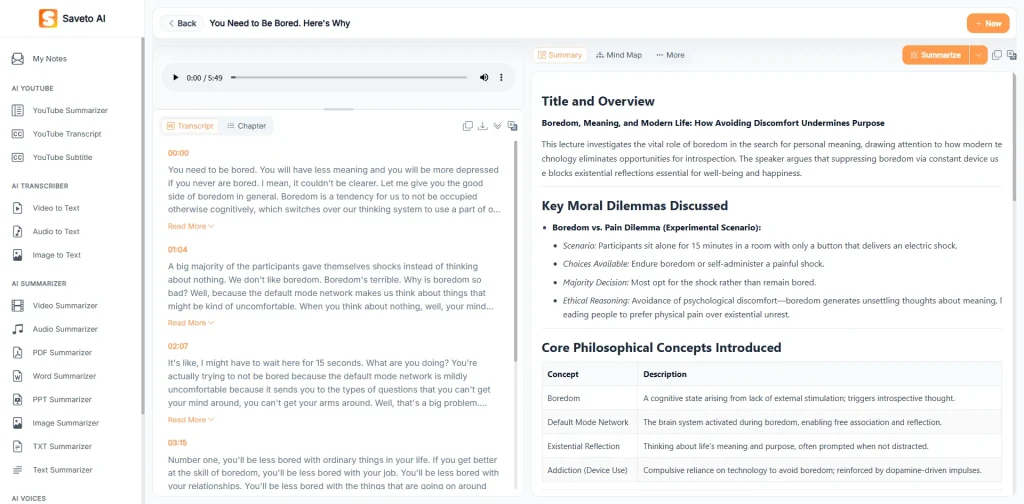
Saveto AI not only delivers accurate raw transcripts, but also generates timestamps, chapter segmentation, and key summaries. This turns long blocks of text into a clear, structured format that is easier to scan, navigate, and reference.
In terms of interface design, it is built around a practical workflow. On the left is the audio upload area. The center displays the transcript along with chapter breakdowns and a precise time-linked timeline, making it easy to jump to specific sections. On the right, users can access summaries and a mind map, covering the entire process from upload and transcription to organization and insight extraction—all within a single interface, without the need for additional tools.
From transcription to understanding
Unlike traditional transcription tools, Saveto AI focuses on helping users actually understand and work with the content. Through features such as AI-powered summaries, chapter segmentation, and mind maps, it enables users to quickly extract key points, understand structure, and build a clear overall framework, making transcripts genuinely usable rather than just textual records.
The AI summary feature offers multiple templates tailored to different use cases, covering a wide range of content processing needs, including:
- Smart Summary (structured key points in table format)
- Simple Summary (quick overview of essential insights)
- Chapter Summary (structured breakdown by sections)
- Core Points Summary (key conclusions and highlights)
- Industry Report (industry trends and analysis)
- Financial Analysis (financial insights and data interpretation)
- Course Summary (key learning points and concepts)
- Annual Report Summary (key insights from reports)
- Note Summary (structured personal notes and takeaways)
Saveto AI vs. ChatGPT: Audio Transcription Feature Comparison
| Feature | ChatGPT (Whisper / GPT-4o) | Saveto AI |
|---|---|---|
| File Size Limit | Up to 25MB | ✅ Up to 100MB |
| Templates | Not supported | ✅ Supported |
| Timestamps | Not supported | ✅ Supported (downloadable) |
| Languages Supported | 57 | ✅ 150+ |
| Chapter Segmentation | Not supported | ✅ Supported (downloadable) |
| AI Summary | Not supported | ✅ Smart Summary + 9+ templates |
| Mind Map | Not supported | ✅ Supported (downloadable) |
| Free Plan | Basic ChatGPT tier | ✅ 100% Free |
Overall, ChatGPT is better suited for lightweight, on-demand audio transcription tasks, while Saveto AI is designed for more complete, workflow-oriented use cases.
From transcription to content organization, key information extraction, and structured output, Saveto AI delivers an all-in-one solution. It not only reduces the time required for post-processing but also significantly improves overall information handling efficiency. For users who rely on transcription frequently or work with more professional, content-heavy workflows, it offers a stronger combination of structure and practicality.
Use Cases of Different Summary Templates in Saveto AI
Traditional transcription tools usually stop at converting audio into plain text. While this preserves the content, users still need to manually extract insights, restructure information, and adapt it for different use cases.
Saveto AI takes a different approach. Instead of treating transcription as the final step, it introduces scenario-based summary templates that turn raw audio into structured, ready-to-use outputs. Depending on the context, the system automatically generates the most relevant format—reducing manual work and making it easier to move from audio to action.
Smart Summary Use Case: Meetings
Built for meetings and team discussions. Instantly turns conversations into structured action points, decisions, and key takeaways in a clean table format—ideal for PMs, team leads, and operators.
Simple Summary Use Case: Podcasts
Designed for fast consumption of long-form content. Extracts the core ideas and insights so users can grasp the essence of a podcast or video in seconds.
Chapter Summary Use Case: Courses
Ideal for lectures and structured learning materials. Breaks content into logical sections, making it easier to review, study, and retain knowledge.
Core Points Summary Use Case: Product Launches
Perfect for high-density presentations and launch events. Distills the most important messages and outcomes so users can quickly understand what matters.
Industry Report Use Case: Research
Tailored for deep-dive interviews and industry content. Extracts trends, insights, and structured findings for analysts, consultants, and researchers.
Financial Analysis Use Case: Finance
Built for financial discussions and reports. Highlights key metrics, numbers, and insights to support fast and accurate interpretation.
Course Summary Use Case: Learning
Optimized for online learning. Organizes key concepts and frameworks into a clear structure that supports efficient study and review.
Annual Report Summary Use Case: Business Reports
Designed for corporate reports and reviews. Extracts key trends, performance highlights, and conclusions for faster decision-making.
Note Summary Use Case: Notes
Helps turn scattered notes into structured knowledge. Ideal for creators and knowledge workers who need clarity and long-term organization.
Conclusion
Overall, ChatGPT is well-suited for basic audio transcription tasks, such as everyday note-taking, lightweight content capture, and short audio processing. With the support of the Whisper model, it delivers solid performance in terms of accuracy and ease of use.
However, when it comes to a complete workflow, its capabilities are still largely limited to raw transcription. It does not natively support features like timestamps, speaker identification, structured summaries, or post-processing. For longer or more complex recordings, users often need additional manual effort to organize the output.
In contrast, Saveto AI is designed to go beyond transcription. It turns audio into structured outputs with summaries, chapter segmentation, and key insights built in—making the content immediately usable. For users who work with audio regularly or care about efficiency, it provides a more complete end-to-end solution.